Instagram Image and Video Sizes in 2026 (And What Actually Gets Cropped)
Every Instagram dimension that matters in one place — plus the part most size guides leave out: your feed post and your profile grid crop to different shapes, so a photo that looks right in one loses its edges in the other.
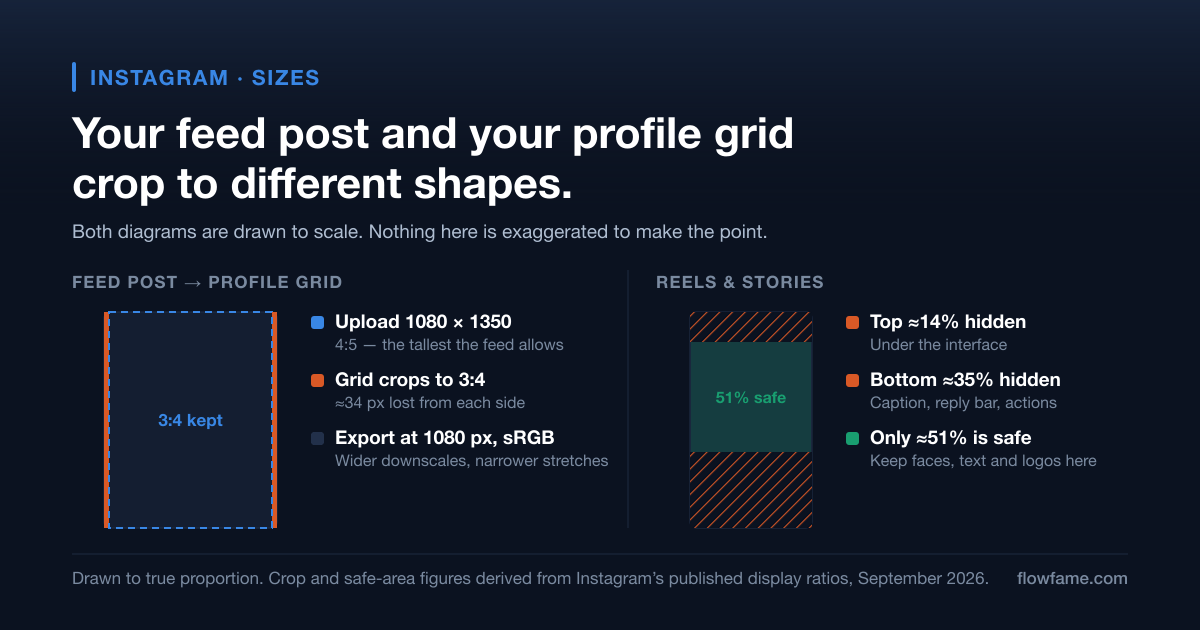
Most size guides give you a table and stop. The table is the easy part — Instagram has published the same three feed ratios for years. What trips people up is that the shape Instagram shows your post in and the shape it shows your profile grid in are no longer the same, so an image that fills the feed perfectly quietly loses its left and right edges the moment someone visits your profile.
This page is the numbers, the crop behaviour behind them, and a preview that runs on your own image so you can see what disappears before you post.
Key takeaways
- Design feed posts at 1080 × 1350 (4:5). It is the tallest shape Instagram allows in the feed and it takes the most screen on a phone.
- Your profile grid crops to 3:4, not 4:5 and not square — so a 4:5 post loses a thin strip from each side on your profile.
- Reels and Stories are both 1080 × 1920 (9:16), and both hide roughly the top 14% and bottom 35% behind interface elements.
- Export at exactly 1080 px wide in sRGB. Anything wider is downscaled by Instagram's encoder; anything narrower is stretched.
- Keep important content — faces, text, logos — inside the centre of the frame, because every surface crops from the edges inward.
Stays on your device — nothing is uploaded.
Feed post sizes
| Format | Upload size | Aspect ratio | What it is good for |
|---|---|---|---|
| Portrait — recommended | 1080 × 1350 | 4:5 | Maximum height in the feed; the default choice for almost everything |
| Square | 1080 × 1080 | 1:1 | Grid-first accounts and carousels mixing photo with graphics |
| Landscape | 1080 × 566 | 1.91:1 | Wide photography and link-style graphics; smallest footprint on a phone |
| Carousel | 1080 × 1350 | 4:5 | All slides must share one ratio — the first slide sets it |
Portrait wins by default for a simple reason: a phone screen is tall, and 4:5 occupies more of it than 1:1 or 1.91:1 do. More screen time per post is the cheapest reach advantage available, and it costs nothing but a crop decision.
Reels and Stories
| Item | Size | Aspect ratio | Note |
|---|---|---|---|
| Reel / Story video | 1080 × 1920 | 9:16 | Full-screen vertical |
| Reel cover image | 1080 × 1920 | 9:16 | Cropped to 3:4 on your profile grid |
| Story image | 1080 × 1920 | 9:16 | Static images work the same as video |
| Story link / sticker area | centre of frame | — | Stickers placed low collide with the reply bar |
| Max Reel length | up to 3 minutes | — | Changes periodically — check before planning a series |
Profile picture, highlights and the grid
| Item | Upload size | How it displays |
|---|---|---|
| Profile picture | 1080 × 1080 | Circle crop, roughly 320 px across — corners are always lost |
| Story highlight cover | 1080 × 1920 | Circle crop taken from the centre of the frame |
| Grid thumbnail | — | 3:4 centre crop of whatever the post was |
The circle crop on profile pictures and highlight covers catches people out more than any other number here. A square logo with tight margins loses its corners; a highlight cover with text near the edge loses the text. Centre the subject and leave generous padding — you are designing for the inscribed circle, not the square.
Export settings that survive Instagram's encoder
Instagram re-encodes everything you upload. You cannot avoid that, but you can stop giving its encoder extra work — which is where most visible quality loss actually comes from.
- Export images at exactly 1080 px wide. Wider files get downscaled by Instagram; narrower files get upscaled. Both soften detail.
- Use the sRGB colour profile, not Display P3 or Adobe RGB. A wide-gamut export is the usual cause of colours that look duller after posting than they did in your editor.
- JPEG at high quality for photographs; PNG for flat graphics, screenshots and anything containing small text.
- Video: H.264 in an MP4 container, AAC audio around 128 kbps, 30 or 60 fps, and roughly 10–12 Mbps for a 1080 × 1920 clip.
- Never add your own letterbox bars to force a ratio. Export at the target ratio instead — baked-in bars get re-cropped along with everything else.
The other platforms, at a glance
| Platform | Format | Size | Aspect ratio |
|---|---|---|---|
| TikTok | Video | 1080 × 1920 | 9:16 |
| YouTube | Shorts | 1080 × 1920 | 9:16 |
| YouTube | Thumbnail | 1280 × 720 | 16:9 |
| YouTube | Channel banner | 2560 × 1440 | 16:9 |
| Snapchat | Spotlight / Story | 1080 × 1920 | 9:16 |
Because the canvas is shared, a Reel can usually be posted to TikTok and Shorts untouched — but each app puts its interface in a slightly different place, so text that clears Instagram's caption bar can still land under TikTok's. Design once for the tightest of the three and you can post everywhere.
If you need to pull an existing video down to re-cut it, our Instagram video downloader and story downloader both work in the browser, and the YouTube thumbnail downloader gives you any thumbnail at full 1280 × 720.
Frequently asked questions
What is the best Instagram post size in 2026?
1080 × 1350 pixels, a 4:5 portrait. It is the tallest ratio Instagram accepts in the feed, so it occupies more of a phone screen than a square or landscape post, and it survives the profile grid's 3:4 crop with only a small trim from each side.
Why does my photo look cropped on my profile grid?
Because the grid previews everything at 3:4, regardless of what you uploaded. A 4:5 portrait loses a strip from each side; a 1:1 square loses the top and bottom. The post itself is untouched — only the thumbnail is cropped.
Does Instagram reduce image quality?
Yes. Every upload is re-encoded. You can minimise the damage by exporting at exactly 1080 px wide in the sRGB colour profile, which means the encoder does not have to rescale or convert colour before compressing.
What size should a Reel cover be?
1080 × 1920, the same as the Reel. Remember that your profile grid shows a 3:4 centre crop of that cover, so anything important placed near the top or bottom of the cover will not appear on your profile.
Can I still post square photos?
Yes, 1:1 is fully supported and nothing is broken about it. It simply takes less vertical space in the feed than 4:5 does, and it loses more height to the profile grid's 3:4 crop.
If you take one number away: 1080 × 1350, with anything you cannot afford to lose kept away from the outer edges. That single decision covers the feed, survives the grid, and leaves you room when you crop the same asset to 9:16 for a Reel.
Last verified September 2026. Aspect ratios have been stable for years; safe-zone margins and length limits are the parts Instagram changes, so treat those as approximate.